
Mic Switchboard
The Mic Switchboard shows the live state of every mic channel in your show — muted or open — at the current moment. Tap any channel to flip its state.
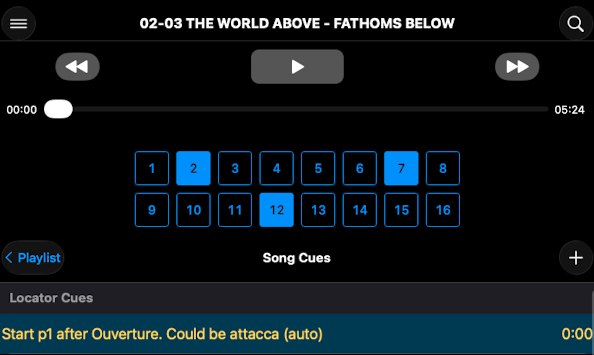
How it works
- On iPad: visible alongside the event list at all times.
- On iPhone: toggle in settings to show or hide.
- Each tap sends the matching mute or unmute command to your mixer immediately.
- The switchboard updates as cue events fire during playback, so it always reflects ShowPlayer's intended state.
Notes
- For live fixes. Tap a channel and the change hits the board instantly — no cue-list editing.
- Tapping doesn't edit cues. Switchboard taps are temporary overrides. They don't change the underlying cue events. The next cue that fires sets the channels back to whatever it commands.
- It reflects ShowPlayer, not the board. If someone changes a channel directly on the mixer, the switchboard won't know — it shows the state ShowPlayer last commanded, not what's actually live on the console.